Knowledge and quick replies
Uploaded documents can be previewed, downloaded, re-indexed, and versioned. Remove unnecessary personal data and internal secrets before upload.
Long-term knowledge and temporary documents
Maintain one document per topic, with versions, rather than a second temporary-policy entry. Long-term knowledge covers products, processes and support information and may remain valid for years. Temporary documents cover limited-time offers, particular batches, compensation or service changes; human confirmation is enabled by default.
New documents in both categories require an explicit start and end. All editor times are Beijing time (UTC+08:00). The start is inclusive and the end is exclusive: an end of October 20 at 00:00 means the document stops applying at the start of that day. A date written in the body does not configure expiry. Keep topics with different validity periods in separate documents. Existing documents without configured expiry are unchanged; administrators can configure dates in maintenance.
Create, edit and publish
- In Knowledge, an administrator selects the online new-document entry or expands the examples for long-term knowledge, limited-time offers and compensation.
- Replace every placeholder with verified rules; fill in title, body, keywords, category, validity and scope.
- Save a new draft. Saving does not publish or call a model. The previous published version remains effective until replacement.
- Verify the saved version, explicitly confirm it and publish it for indexing. Unsaved changes must be saved first. Indexing may consume AI points according to actual model use; see Billing.
- Replacement retires the previously published version to history. Check indexing status: publication is not proof of completed indexing and does not enable automatic reception.
Versions retain the same topic title; create a new document for a new topic. Online body editing is limited to 200,000 characters and 512 KiB. History loads only on request, 10 versions per page. Regular members can view but cannot edit or publish. Examples do not automatically create or activate business rules.
Scope and human confirmation
Selecting no channels means all channels. Advanced scope accepts actual product SKU, batch, campaign, customer-segment and region identifiers, comma-separated. Multiple values within a field are alternatives; restrictions across fields must all match. Missing context is not guessed. Current automatic reception supplies channel context only, so documents restricted by advanced business fields require human verification. Matching does not approve a refund or prove customer eligibility.
Documents requiring human confirmation are excluded from automatic replies. Keep this enabled for refunds and compensation; verify order, amount, eligibility and previous handling. AI does not promise or execute payments, refunds or compensation. Unchecking it does not bypass existing consent, risk or sending gates.
Expiry, reminders and retained history
The tenant homepage counts published long-term and temporary documents expiring within 3 days; unpublished drafts are excluded. Legacy standalone policy reminders remain separately visible. Expiry is checked during retrieval and before automatic sending, not by a cleanup job or administrator login. At the exclusive end, the document is no longer used for new AI answers.
Expiry or pause retains original text, previous versions and existing messages. To renew, review the same document, set new dates, save a new draft and explicitly publish. Renewal and indexing do not happen automatically. Historical and expired versions still count toward knowledge capacity; viewing does not call a model. Existing standalone policies are not deleted or bypassed by the new document classification.
File uploads also require category, validity, channel scope and explicit publication acknowledgment. Advanced scope can be added through online maintenance after safe processing. The screenshot below shows the older upload interface without the new fields.
- Business knowledge describes durable product and support guidance.
- Temporary policies require an effective period and scope.
- Historical conversations may guide tone, but never become policy automatically.
Check suggested sources before inserting and editing. Automatic reception requires separate mode selection and channel consent.
Upload and verify
Administrators expand “Upload a knowledge document” in Knowledge, enter the topic title, select long-term or temporary, and set validity, channels and human-review requirements. Select TXT, Markdown, PDF or DOCX (maximum 10 MiB), verify the file and publication acknowledgment, then choose “Upload and publish after processing”. Reuse the topic title for a replacement version. Wait for security processing, parsing and indexing instead of repeatedly uploading.
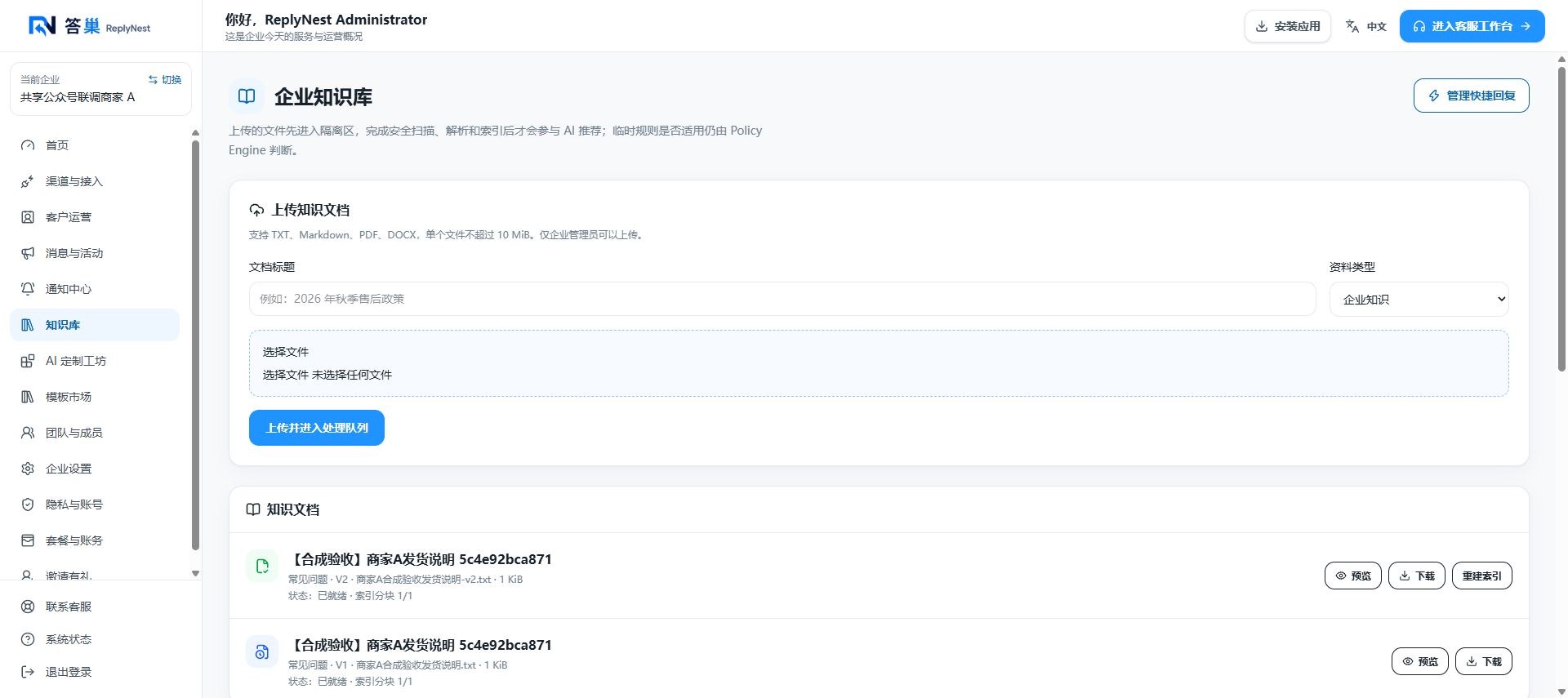
October 8, 2026 screenshot uses synthetic test documents. Check preview text, dates and conditions. Drafts need explicit publication; a successful upload or download is not proof of reception readiness. Use one topic per section with audience, question, answer, exceptions and effective date. Prefer extractable text over image-only scans.
Marketplace and history-generated drafts need review for accuracy, sources, privacy and expiry before publication/indexing. Repeated historical answers do not automatically become policy.
Quick replies and issues
Quick replies are agent phrases, not automatic AI knowledge. Administrators/supervisors manage them in Knowledge, regular agents search/use them with / and check before sending. The workspace management link does not grant edit rights.
For stalled processing refresh and report title/time; for garbled content use UTF-8 or extractable text and verify preview. For AI handoff check publication, indexing, conditions, conflicts, risk and threshold, not just file existence. See Billing for charges.