Website chat
A workspace administrator can open Channels → Website chat, enter a support name and an HTTPS website URL, and create the channel. Paste the generated script before your website's closing </body> tag. Never put an API secret in website code.
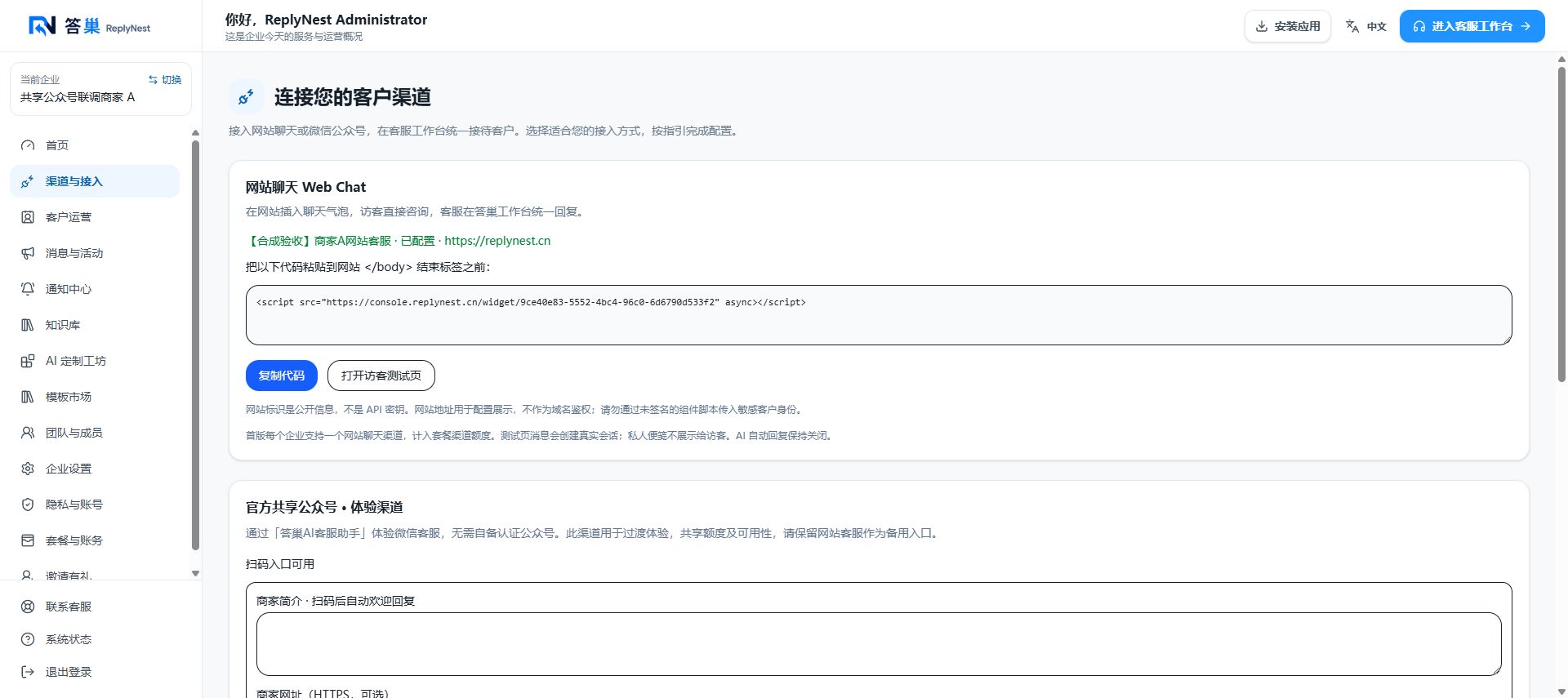
October 8, 2026 Chinese test-business screenshot. Copy your own generated embed code, not the screenshot's public test identifier. Ask your website maintainer to install it if you lack publishing access. Then prepare knowledge and choose an AI mode separately.
The first release supports one website channel per workspace and counts toward the plan's channel allowance. The website URL is descriptive configuration, not an origin allowlist or authentication boundary. The website identifier is public.
Test the conversation
- Open the visitor preview or your website and click the chat bubble.
- Send a test message without sensitive personal information.
- Refresh the conversation list in the ReplyNest support workspace.
- Reply manually and confirm delivery in the visitor window.
- Private notes are team-only. AI suggestions must be reviewed and explicitly sent; installing website chat does not enable automatic AI replies.
Visitor continuity depends on browser site data. Clearing storage, private browsing, or changing devices may create a new visitor. Self-reported visitor names are not verified identities; verify identity before discussing sensitive business data.
Deployment notes
Allow the embed script and support site's scripts, iframe, HTTPS and WebSocket connections in your content security policy. Ad blockers and network restrictions may prevent loading. Disclose chat data processing in your website privacy notice. Do not pass sensitive identities through unsigned JavaScript.
If setup fails, refresh to check its result before retrying. Retries recover using a stable inbox identifier. Signed logged-in identities, multiple independent website inboxes, and domain allowlist management are outside this first release.